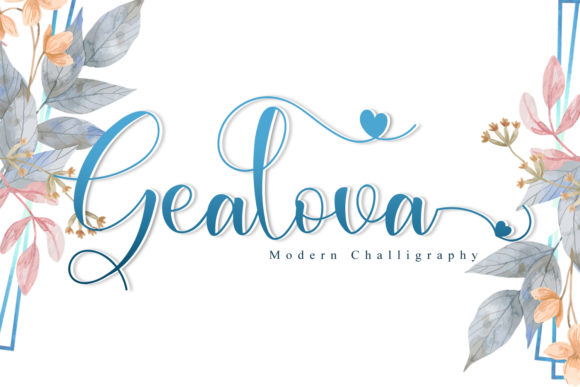
Gealova: A Timeless Handwritten Font for Elegant Design
Gealova is a delicate and timeless handwritten font that brings a personal, authentic touch to any design. Whether you're creating wedding invitations, thank you cards, or logos, Gealova adds a sense of warmth and sophistication that's hard to match. Its smooth lines and elegant swashes make it ideal for projects that require a humanized, artistic feel.
This premium font is PUA encoded, which means you can access all the glyphs and swashes without needing special software. The varying baseline and beautiful alternates give your designs a unique, handcrafted look that stands out from generic typefaces. Gealova isn't just a font—it's a design tool that enhances creativity and expression.
Where Gealova Shines in Design Projects
Gealova works best in projects that benefit from a personal, artistic touch. It's a favorite among designers who want to add a handwritten feel to their work. For example, wedding invitations often use Gealova to create a romantic, intimate atmosphere. The font's soft curves and flowing lines complement floral elements and vintage aesthetics perfectly.
Thank you cards and greeting cards also benefit from Gealova’s elegance. When paired with simple, clean layouts, the font becomes the focal point, drawing attention to the message. It's also a great choice for quotes and motivational graphics, where the visual appeal of the text matters as much as the words themselves.
In branding, Gealova can be used for logo design, especially for businesses that want to convey a sense of craftsmanship or personal connection. It's not a traditional serif or sans serif font, but rather a script font that offers a modern yet classic feel. This makes it suitable for small businesses, boutique brands, and creative studios looking to stand out.
How Gealova Influences Visual Hierarchy and Brand Perception
Typography plays a crucial role in how audiences perceive a brand. Gealova's unique style helps establish a distinct visual identity that resonates with specific audiences. Its handwritten nature gives a sense of authenticity, making it ideal for brands that want to appear approachable and genuine.
When used effectively, Gealova can guide the eye through a design. Because it's a display font, it works best in headlines, titles, and short phrases rather than long paragraphs. This makes it perfect for editorial design, packaging, and social media graphics where clarity and impact are key.
Readability is an important consideration when using Gealova. While it's visually appealing, it may not be the best choice for body text. However, when paired with a complementary sans serif or serif font, it can enhance readability while maintaining its artistic flair. For instance, pairing Gealova with a clean, modern font like Montserrat or Lato creates a balanced contrast that improves overall legibility.
Choosing the Right Font for Your Project
Before using Gealova, consider the purpose of your design. Is it for a formal event, a casual marketing campaign, or a personal project? The font's personality should align with the message you want to convey. For example, a luxury brand might prefer a more refined script, while a creative startup might lean into a bolder, more expressive style.
Testing different font pairings is essential. Experiment with how Gealova looks alongside other fonts in your design. Pay attention to spacing, weight, and overall harmony. If you're working on a website or app, ensure that the font displays correctly across devices and browsers. Some web platforms may not support PUA encoding, so check compatibility before finalizing your design.
Also, review the commercial licensing terms. Gealova is a commercial font, meaning it can be used in professional projects, but you need to confirm the specific usage rights. This is especially important if you're designing for clients or selling products that include the font.
Practical Tips for Using Gealova in Your Work
If you're new to using handwritten fonts, start by applying Gealova to small design elements. Use it for headings, captions, or decorative accents rather than large blocks of text. This allows you to appreciate its beauty without compromising readability.
For business cards and logos, consider how Gealova will look in different sizes. At smaller scales, some details may become less visible, so test it at various sizes to ensure it remains clear and legible. You can also adjust the spacing and sizing within your design software to optimize its appearance.
When working on print projects, make sure to use high-quality output settings. Handwritten fonts can sometimes lose detail when printed at low resolution. Always preview your design in print mode to catch any issues before sending it to the printer.
Finally, don't be afraid to experiment. Gealova offers a wide range of glyphs and alternates, so take time to explore what works best for your project. Whether you're designing for a client or personal use, the right application of this font can elevate your work and leave a lasting impression.